01 · The mess
Where did October go?
A coffee here, a subscription you forgot, rent, an e-transfer to a friend. On a bank statement it all blurs together.
Now on Google Play · Made in Canada
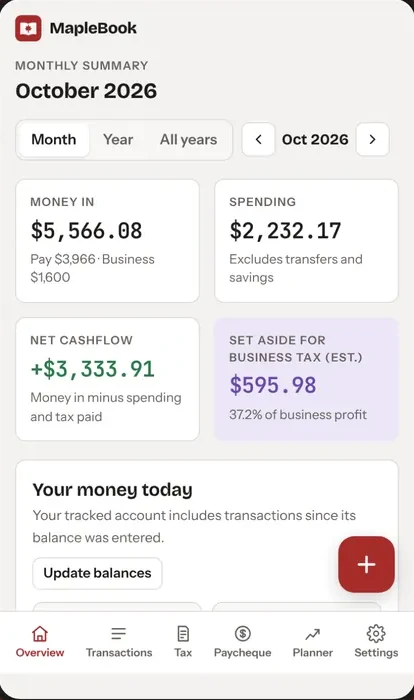
Income, spending, savings and an estimate of your tax, in one calm picture. Built for Canadians with a job, a side business, or both.
Free to download · Android · No ads · Ages 18+
Import statements from
TD, RBC, CIBC, BMO, Scotiabank, Tangerine, Simplii, EQ Bank, Desjardins and most credit unions (PDF), plus CSV, OFX and QFX from most Canadian banks. Not affiliated with any bank.
01 · The mess
A coffee here, a subscription you forgot, rent, an e-transfer to a friend. On a bank statement it all blurs together.
02 · Sort it
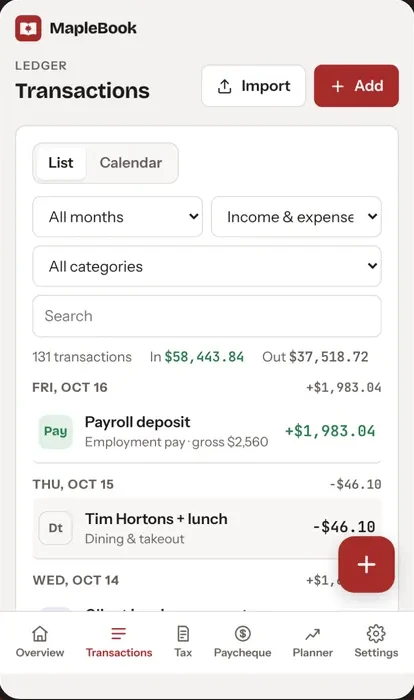
Import PDF, CSV or OFX statements from Canadian banks, read on your phone. Check each line, then it lands in your own categories.
03 · See it
Money in, money out and where it went, month by month and year over year. No spreadsheets.
04 · Plan it
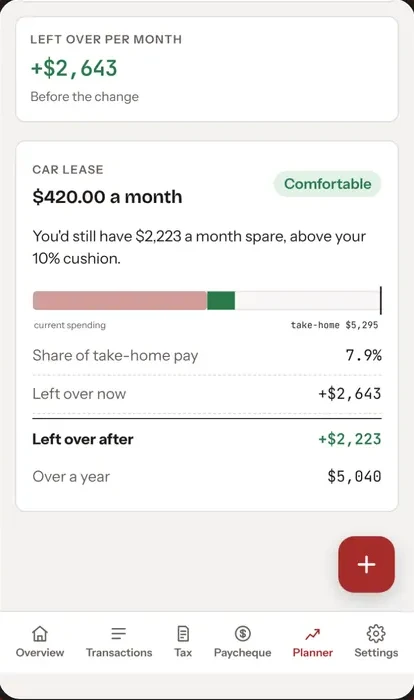
Test a new expense, a car lease or a big purchase and see what would be left each month, before you sign anything.
05 · No surprises
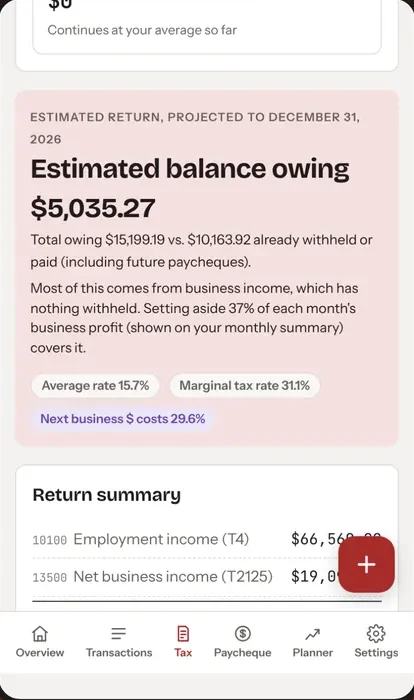
An estimate of federal and provincial tax, CPP and EI as the year goes, including what to set aside from side-business income. Estimates only.
Try it · 20 seconds
Slide to your own rough numbers. Nothing is saved or sent anywhere. Starting values are made-up examples.
Left after the basics
$680
$22 a day
Breathing room. Give that money a job.
Simple arithmetic for budgeting only, not financial advice. MapleBook tracks the real numbers for you, every month.
Track it for realEverything in one app
Read PDF, CSV and OFX statements from Canadian banks on your phone, then check each line before it is saved.
Federal and provincial tax, CPP and EI, year to date and projected to December 31. Quebec provincial tax is a simplified estimate.
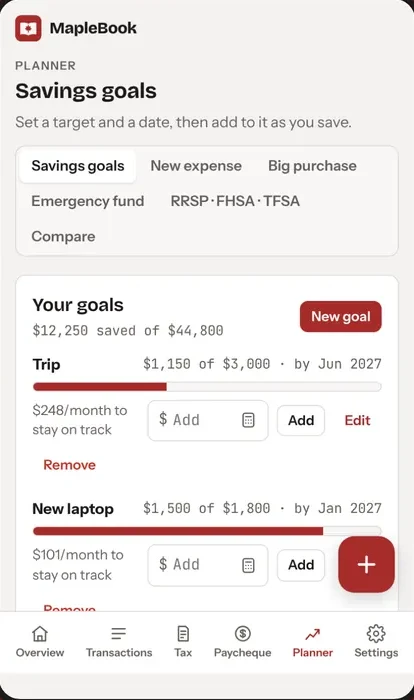
Set a target and a date, add to it as you go, and see what to put aside each month.
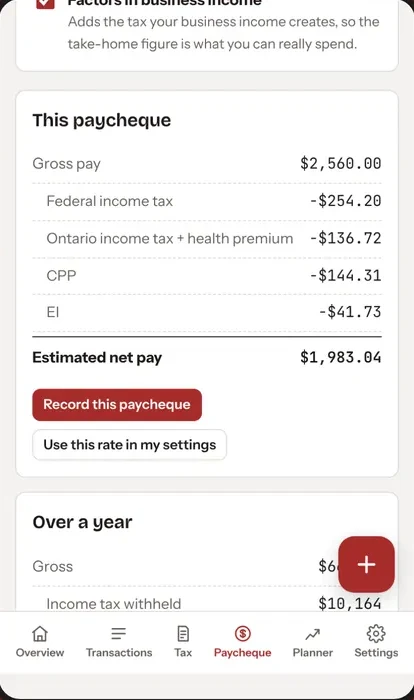
CPP, EI and income tax on each paycheque, and what lands in your account.
Households of up to 6 people: shared spending, bills and goals, who paid, and settle up 50/50, by income or your own way. Your personal budget stays private, and you choose what others see about your income. One subscription covers the whole household.
🍁 Canadian through and through
All 13 provinces and territories, with the 2026 brackets and credits. Paycheque estimates are tested against the CRA's payroll formulas.
Your own budget stays on your phone. If you sign in for a household or to sync, your data is stored in Canada.
The app, this website and the legal texts are in both languages. The app follows your phone's language.
MapleBook is made by Maple Book Software, an independent Canadian business. It is not affiliated with, endorsed by or acting for the Government of Canada, the Canada Revenue Agency, Revenu Québec or any provincial or territorial government, and it does not provide government services.
The tax rates, CPP, QPP, EI, QPIP and contribution limits in MapleBook come from these official pages:
Private by design
Using MapleBook for your own budget needs no account: your budget stays on your device. Only feedback you choose to send reaches us.
If you sign in (needed for households and to sync between your devices), your personal data is stored privately with our hosting provider in Canada. Nobody else can see it, including other members of your household.
Only what you put in a household is shared, and only with its members. You choose what they see about your income.
Bank statements you import are read on your device. The files are not uploaded to us.
If you link a bank (optional), your transactions come to us through Plaid and wait in To review until you add or skip them. We never see your bank password.
We do not sell your information, show ads, or use third-party advertising or analytics trackers.
Payments are handled by Google Play. We never see your card details.
How we handle your data, in plain words
Read the Privacy Policy
Simple pricing
$0
$9.99 CAD/month
or $99.99 CAD a year
7-day free trial for first-time subscribers. One subscription covers everyone in your household. Renews automatically until you cancel in Google Play.
Free to download on Android. Your budget stays on your phone.
Yes. Everyday budgeting, savings goals and backups are free. MapleBook Plus adds households, statement imports, tax and paycheque estimates and the planning tools for $9.99 CAD a month or $99.99 CAD a year, with a 7-day free trial for first-time subscribers.
No. For your own budget everything stays on your phone, with no account. An account is only needed for a household or to sync between devices.
On your phone. If you sign in, your data is stored with our hosting provider in Canada. Statements you import are read on your phone and never uploaded.
No. MapleBook shows estimates for budgeting. The CRA (and Revenu Québec in Quebec) sets your actual tax. Talk to a qualified professional before making tax or investment decisions.
Yes, with QPP and QPIP. Quebec provincial tax is a simplified estimate.
PDF statements with selectable text from TD, RBC, CIBC, BMO, Scotiabank, Tangerine, Simplii, EQ Bank, Desjardins and most credit unions, and CSV, OFX or QFX downloads from most Canadian banks.
Yes, with a household (up to 6 people). Each transaction is yours or shared; you choose what others see about your income; settle up 50/50, by income or your own way. One subscription covers everyone in the household.
Not yet. MapleBook is on Android. You can try every screen in the demo in your browser.
In Google Play (Profile → Payments & subscriptions → Subscriptions → MapleBook Plus) or in the app (Settings → MapleBook Plus → Manage subscription). Plus stays on until the end of the period you paid for.
You only have a MapleBook account if you signed in to use a household or to sync between devices. You can delete it and all the MapleBook data stored with it at any time:
Deleting the account permanently removes your sign-in and your synced personal data, and takes you out of your household (what you shared stays with the household). It doesn't cancel a MapleBook Plus subscription: cancel that in Google Play (Payments & subscriptions → Subscriptions). Data that is only on your phone is removed when you choose "Delete everything" in Settings or uninstall the app. See the Privacy Policy for details.
Questions or support: support@maplebooksoftware.com · Send feedback